

An AI-Powered Data Analysis and Collaboration Solution that provides:

One View
The Foundation of Clarity
“Bring product data, context, and conversations into a single, shared view.”
Eliminate data fragmentation across your enterprise. SharedLens integrates disparate sources into a single, cohesive perspective, providing subject matter experts (SMEs) complete visibility to source data and the ultimate target schema.
Aligned Decisions
The Power of Consensus
“Keep engineering, operations, and leadership aligned on what’s changing and why.”
Data without context is just noise. SharedLens transforms raw information into structured, actionable insights, empowering your SMEs and leadership to collaborate, analysis, and disposition from a shared understanding. When everyone sees the same reality, decision-making becomes faster, safer, and inherently collaborative.

Trusted Outcomes
The Standard for Reliability
“Reduce rework, surprises, and risk with decisions you can stand behind.”
In manufacturing, there is no room for error. SharedLens delivers high-integrity data mapping and robust orchestration, ensuring that every transition is precise and every outcome is verifiable. Build your future on data you don't just use—you trust.
AI-Powered
Turn Fragmented Data into Aligned Decisions With AI Assisting Every Step
SharedLens is an AI‑powered collaborative environment for working through complex data, decisions, and transformations—together. It brings multiple data sources, stakeholders, and evolving requirements into a single workspace where teams can review, interpret, and resolve gaps before execution—with AI helping surface insights, structure decisions, and accelerate alignment.
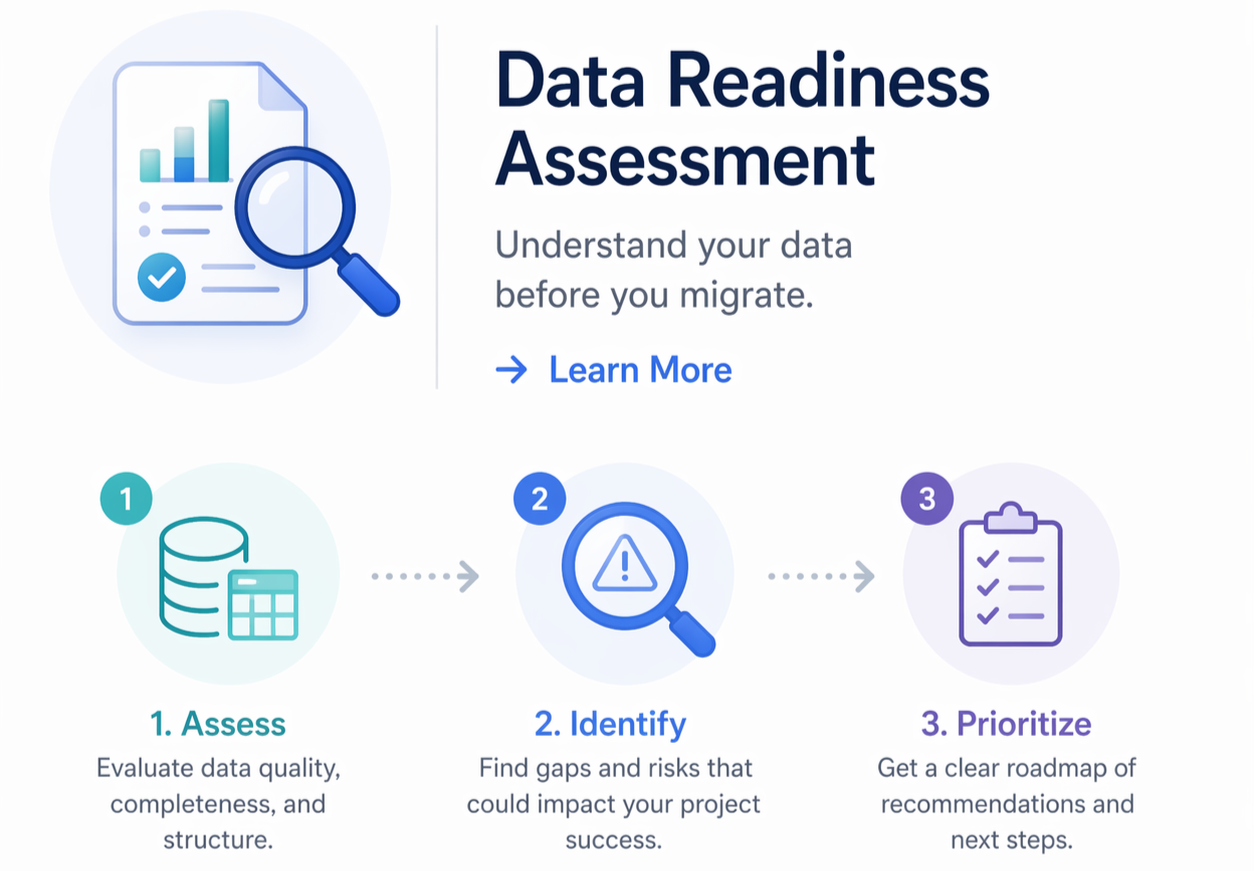
Data Readiness Assessment
Get Started Today
Key Benefits
ETL on Steroids Ensuring Faster, More Accurate, and Collaborative Projects

Accelerated Migration Timelines: Streamlines ingestion and mapping to significantly reduce project duration.
Improved Data Quality: Uses automated consistency checks to catch and address anomalies early.
Reduced Manual Errors: Limits the risk of data corruption or human error through automation and structured workflows.
Enhanced Team Collaboration: Provides transparent workflows that keep everyone aligned throughout the lifecycle.
Enterprise Scalability: Built to comfortably handle massive volumes of complex enterprise data from multiple legacy systems.
Data readiness assessments: ensure each data project has a foundation for success.
The Solution
Overview
SharedLens serves as an intelligent, multi-source migration platform designed to streamline the complex process of transferring data from disparate systems into the enterprise applications (i.e. PLM, PDM, ERP, ECM, CPQ, etc.). At its core, it acts as a robust engine for aggregating information, leveraging advanced data mapping techniques to ensure that source data from various repositories is accurately translated, and aligned with the target schema required by target applications.
Furthermore, SharedLens is purposefully designed to empower subject matter experts, ensuring they are at the center of addressing mapping challenges. By providing intuitive interfaces and transparent mapping logic, it enables these domain specialists to directly guide and resolve complexities, ensuring the data accurately reflects the business logic and standards they dictate throughout the migration.
Operational Overview
Stage 1: Initial Import Activity
The process begins with the end user identifying the specific data sources and data types designated for migration. As part of the SharedLens services engagement, this data is converted into an Adaptive Markup Language (AML) format. This AML file structure is what is ultimately imported into the SharedLens environment.
Upon entering the system, a unique pedigree is established for every single tag-value item, identifying the exact source, the user who performed the action, and the specific date and time of ingestion. To ensure absolute data integrity, the system deliberately establishes this lineage and tracking pedigree first, rather than attempting to align or force the data to the target schema at this early stage.
Stage 2: Preliminary Mapping Exercise
During stage two, the imported data is evaluated by an AI engine to optimize the linkage between the source data and the target schema. Upon completing this automated process, some tag values will naturally remain unmapped and will require a level of disposition. This is where the domain subject matter experts step in. Based on their deep experience and operational understanding, they handle the process of evaluating and mapping these orphaned attributes. Accordingly, SharedLens is explicitly designed to support multiple users, roles, and varied expertise to guarantee all data is properly reconciled.
“SharedLens uses AI to augment—not replace—your team’s expertise:”
Stage 3: Preliminary Mapping Validation
Once users believe all the data has been reconciled, stage three generates a preliminary mapping of the data to the target schema. This full mapping structure is entirely available for open review, allowing organizations to thoroughly evaluate, validate, and finalize the exact data footprint they want to bring over and manage within target enterprise environment.
Stage 4: Final Import Operation
Once the organization confirms that the data has been properly and accurately mapped, they execute the final import into the target environment. This is an entirely automated process within SharedLens. The system ensures that all data seamlessly maps to the target item types and attributes. Furthermore, any associated physical files are imported during this step, with their own specific item types and corresponding attributes created exactly as previously defined.
How Are Customers are using SharedLens
Typical Use Cases
Data migration and transformation initiatives: A structured, AI-assisted alternative to traditional, manual approaches
Enterprise system programs (PLM, ERP, QMS): Align source data, target schemas, and stakeholders
Classification and data organization efforts: Accelerate early-stage structuring and rationalization of data
Cross-functional decision management: Capture and resolve decisions tied directly to underlying data
What It is Doing
Ingests multiple data sources: Work with data across systems, spreadsheets, and shared repositories.
Supports staged processing and analysis:
Organize how data is reviewed, refined, and mapped over time—with AI helping structure and guide the workflow.Enables collaborative data interpretation:
SMEs review, connect, and align data to target models, with AI assisting in highlighting patterns and inconsistencies.Tracks issues and gaps: Automatically generate and manage issues tied to decisions and data gaps—reducing manual tracking and follow-up.
How AI Is Applied
Identify gaps and inconsistencies across large data sets
Surface decision points where alignment is required
Assist in organizing and structuring data for review and mapping
Generate and manage issues tied directly to data and decisions
Accelerate collaboration by reducing manual analysis and coordination

Data Readiness Assessment
Know what you have, what’s missing, and what needs to be cleaned before migration begins.

Let’s Get Started
SharedLens operates as a true Software-as-a-Service (SaaS) platform hosted in the cloud. The pricing structure is designed around flexibility and a fixed monthly infrastructure fee alongside a per-user fee to easily accommodate natural team scaling throughout the project lifecycle:
Base Usage Fee: Starting at $1,000 per month for the dedicated cloud instance.
User License Fee: Starting at $250 per month for each user actively participating in the four-stage migration/data analysis process.
